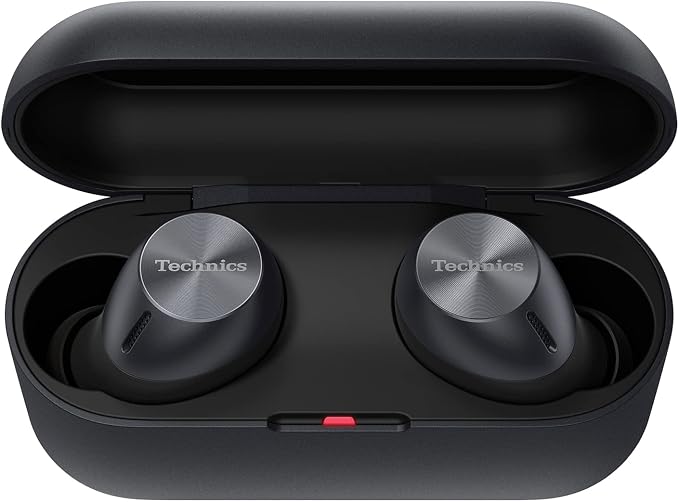
Technics True Wireless Multipoint Bluetooth Earbuds with Microphone HiFi Clear Calls Long Battery Life Lightweight Comfort Fit Alexa Built In EAH-AZ40-K (Black)
Technics True Wireless Multipoint Bluetooth Earbuds with Microphone HiFi Clear Calls Long Battery Life Lightweight Comfort Fit Alexa Built In EAH-AZ40-K (Black)
Confirm your device model and select the matching option. See the product description for compatibility.
Compatibility guide ↗Couldn't load pickup availability
- Not Just for Music: Enjoy legendary Technics engineering for crystal clear sound in your phone and video calls and rich, expansive audio in everything from audiobooks to movies - Product Note : If the size of the earbud tips does not match the size of your ear canals or the headset is not worn properly in your ears, you may not obtain the correct sound qualities or call performance. Change the earbud tips to ones that fit more snugly in your ears - Switch Seamlessly From Your Computer to Mobile Devices: Go from video calls, to phone calls, to listening to music or working out; Multi-Point Connectivity lets you pair to more than 2 Bluetooth devices easily and reliably - Ergonomic, Comfortable Design for A Custom Fit: Pairing timeless design with modern technology, AZ40 offers a comfortable in-ear headphone shape with 4 earpiece sizes to choose from for your best fit - Hear and be Heard, Even in Noisy Surroundings: Enjoy clear calls that amplify words and reduce outside sounds; JustMyVoice technology features 6 individual mics, with a snug, noise-reducing fit and advanced wind noise reduction - Easy Setup with Long Battery Life: Quick setup with the Technics Audio Connect app, with 7.5 hours battery life (25 hours total including cradle charge) - Charging case: Approx. 2.5 hours. Earbuds with Charging case: Approx. 3 hours
From the manufacturer
How do I do the initial setup of the earbuds and connect them to a device?
The earbuds are not fitting in my ears properly. How do I get a better fit?
Can I switch my connection from one Bluetooth Device to another?
How do I utilize Touch Controls?
Why does one earbud have better battery life than the other?
How do I do the initial setup of the earbuds and connect them to a device?
Once the earbuds are charged, remove from the charging cradle, enable Bluetooth on your device, and select “EAH-AZ40” for pairing. If prompted for a passkey, input “0000” (four zeros). Consult the Operating Instructions for more detail.
The earbuds are not fitting in my ears properly. How do I get a better fit?
Choose an earpiece size that fits snugly, and twist gently as you insert in your ear for a secure seal. The Technics logo should read straight when they are inserted correctly.
Can I switch my connection from one Bluetooth Device to another?
Yes! Once you pair your AZ40 earbuds to your devices via Bluetooth (see User Guide) you can connect to your devices through the device settings or through the Technics audio app.
How do I utilize Touch Controls?
Consult your User Guide for a full key of Touch Controls, including play/pause, voice assistant, receive/reject call, and track forward/back.
Why does one earbud have better battery life than the other?
The earbud that is removed from the case first starts the Bluetooth pairing process with your devices which may result in a slightly shorter battery life.
Shipping & delivery
Read our Shipping Policy for the current delivery terms. Available rates are shown during checkout.
Returns & support
See our Return Policy for eligibility and terms.
Contact us with a product question or your order number.